minecraft

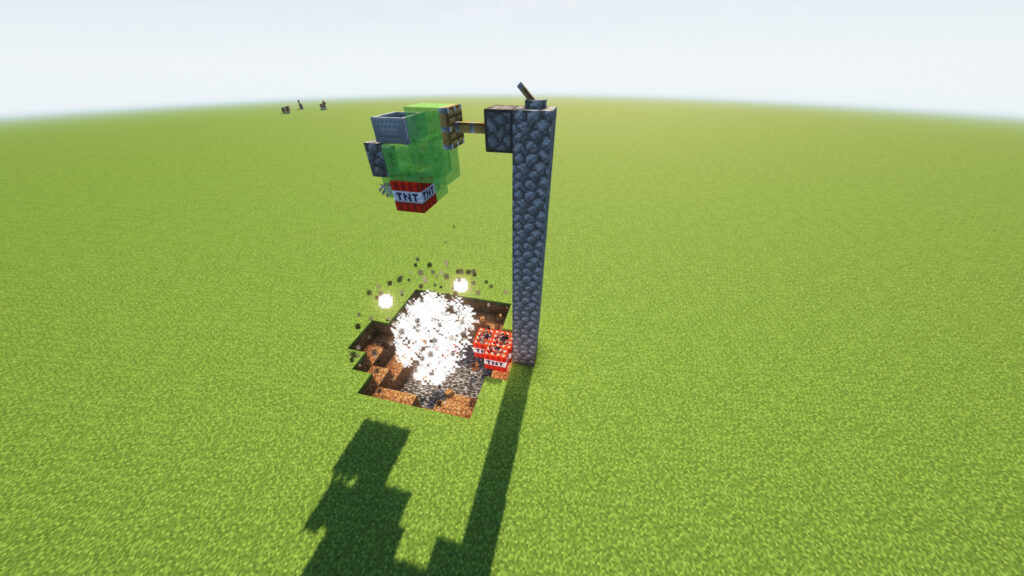
Minecraft TNT Duper v26

๐Ÿ’ฅ Minecraft TNT Duper V26 Guide (Java & Bedrock)

Minecraft TNT Duper

๐ŸŽฎ What Is a TNT Duper?

A Minecraft TNT Duper is an advanced redstone machine that generates primed TNT explosions from a single TNT block. It is widely used in Technical Minecraft, Survival Worlds, Mega Base Projects, and Automated Mining Systems to clear large areas quickly and efficiently.

๐Ÿค” Why Use a TNT Duper?

โšก Fast Terrain Clearing

Perfect for:

  • โ›ฐ๏ธ Removing mountains
  • ๐Ÿ•ณ๏ธ Digging underground bases
  • ๐ŸŒ Creating perimeters
  • ๐Ÿš‡ Building tunnels
  • ๐Ÿ”ฅ Nether excavation

๐Ÿ’Ž Save Resources

Instead of constantly gathering Gunpowder and Sand, players can use a TNT duper for large-scale projects.

๐Ÿค– Redstone Automation

TNT dupers are commonly combined with:

  • ๐Ÿš€ Flying Machines
  • ๐Ÿš‡ Tunnel Borers
  • ๐ŸŒ World Eaters
  • ๐Ÿญ Quarry Systems

๐Ÿ–ฅ๏ธ Java Edition vs ๐Ÿ“ฑ Bedrock Edition

โ˜• Minecraft Java Edition

โœ… Supports most TNT duper designs including:

  • Flying Machine TNT Dupers
  • Tunnel Bore TNT Dupers
  • World Eater TNT Dupers

๐Ÿ“ฑ Minecraft Bedrock Edition

โš ๏ธ Most Java TNT dupers don’t work due to different redstone mechanics.

However, Bedrock players can still enjoy:

  • ๐Ÿ’ฅ TNT Cannons
  • ๐Ÿš€ TNT Launchers
  • โš™๏ธ Version-specific TNT machines

๐ŸŽ‰ Why Is It So Fun?

๐Ÿ’ฅ Endless Explosions

Watching TNT automatically destroy terrain is incredibly satisfying.

๐Ÿง  Learn Advanced Redstone

TNT dupers teach:

  • ๐Ÿ‘€ Observer Mechanics
  • ๐Ÿ”ฉ Pistons
  • ๐ŸŸฉ Slime Blocks
  • ๐Ÿš€ Flying Machines

๐Ÿ—๏ธ Build Bigger Projects

Clear massive areas faster and focus more on building.

โญ Fun Rating

  • ๐Ÿ’ฅ Explosions: โญโญโญโญโญ
  • โš™๏ธ Automation: โญโญโญโญโญ
  • ๐Ÿง  Redstone Learning: โญโญโญโญโญ
  • ๐Ÿฐ Mega Projects: โญโญโญโญโญ

๐Ÿ† Overall Rating: 5/5

Keywords: Minecraft TNT Duper, TNT Duplicator, Java Edition TNT Duper, Bedrock TNT Machine, Flying Machine TNT Duper, World Eater, Tunnel Bore, Redstone Engineering, Automatic Quarry, Survival Automation, Unlimited TNT, Technical Minecraft. ๐Ÿš€๐Ÿ’ฅโ›๏ธ

———————————————————————————————————————————————————————————————————————————————————————————————————————————————-

๐Ÿ”จ How to Build This TNT Duper

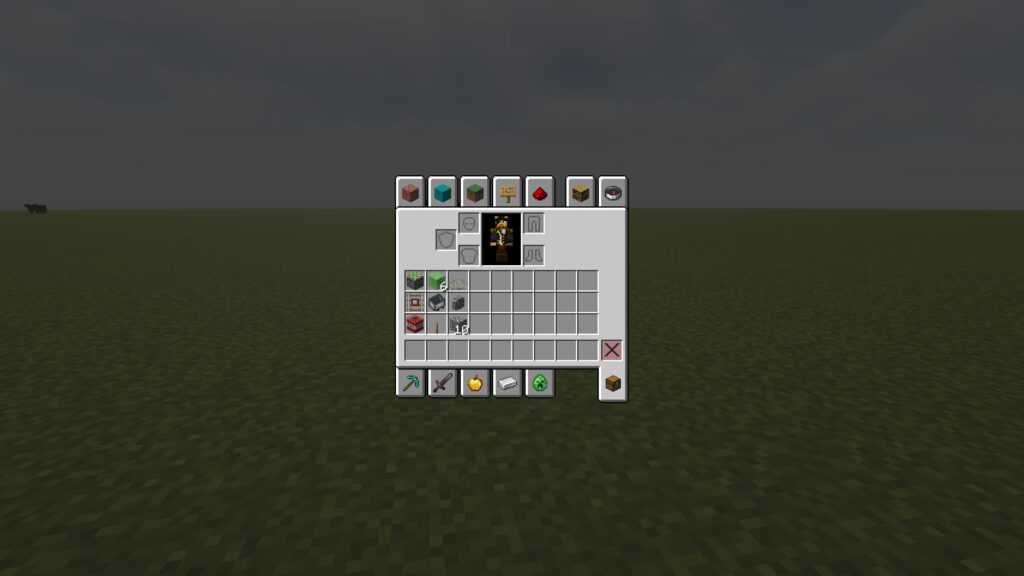
๐Ÿงฑ TNT Duper Materials List

TNT Duplicator Materials Required

๐Ÿ”ฉ Redstone Components
  • ๐ŸŸข 1 Sticky Piston
  • ๐ŸŸฉ 6 Slime Block
๐Ÿš‚ Rail Components
  • ๐Ÿ›ค๏ธ 1 Detector Rail
  • ๐Ÿšƒ 1 Minecart
๐Ÿ’ฅ TNT Components
  • ๐Ÿ’ฃ 1 TNT Block
  • ๐Ÿชธ 1 Dead Horn Coral Fan
  • ๐Ÿงฑ 1 Wall Block (Cobblestone Wall shown)
๐Ÿšง Building Materials
  • ๐Ÿชต 10+ Building Blocks (any block)

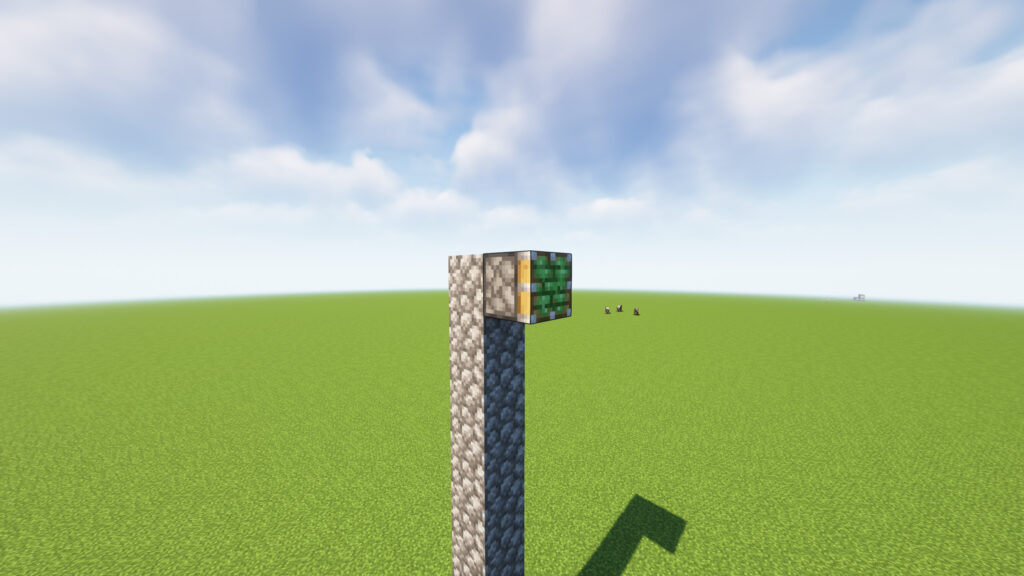
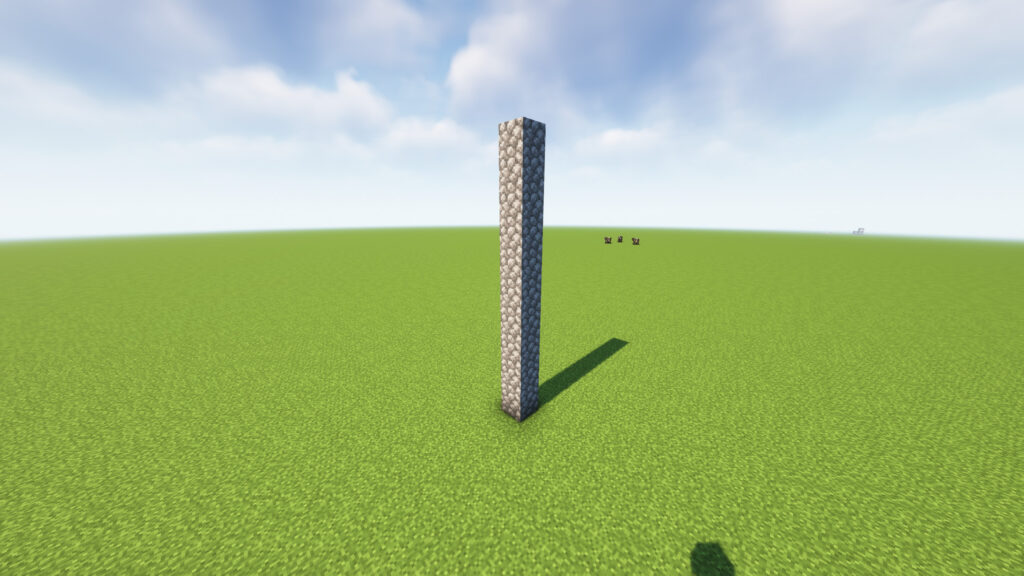
๐Ÿ“ Step 1: Build a 10-Block-High Pillar ๐Ÿงฑ

Start by creating a vertical pillar that is 10 blocks tall using any temporary building block.
Bedrock TNT Machine

๐Ÿ“ Instructions

  1. Choose a flat area to build.
  2. Place 1 block on the ground.
  3. Continue stacking blocks upward.
  4. Stop when the pillar reaches 10 blocks high.

๐Ÿ“ Dimensions

  • Width: 1 Block
  • Length: 1 Block
  • Height: 10 Blocks

๐Ÿ“ Step 2: Place the Sticky Piston ๐Ÿ”ฉ

Now move to the top of the 10-block pillar.

๐Ÿ“ Instructions

  1. Stand at the top of the pillar.
  2. Place 1 Sticky Piston on the side of the top block.
  3. Make sure the green sticky face points outward away from the pillar.

๐Ÿงฑ๐ŸŸฉ
๐Ÿงฑ
๐Ÿงฑ
๐Ÿงฑ
๐Ÿงฑ
๐Ÿงฑ
๐Ÿงฑ
๐Ÿงฑ
๐Ÿงฑ
๐Ÿงฑ

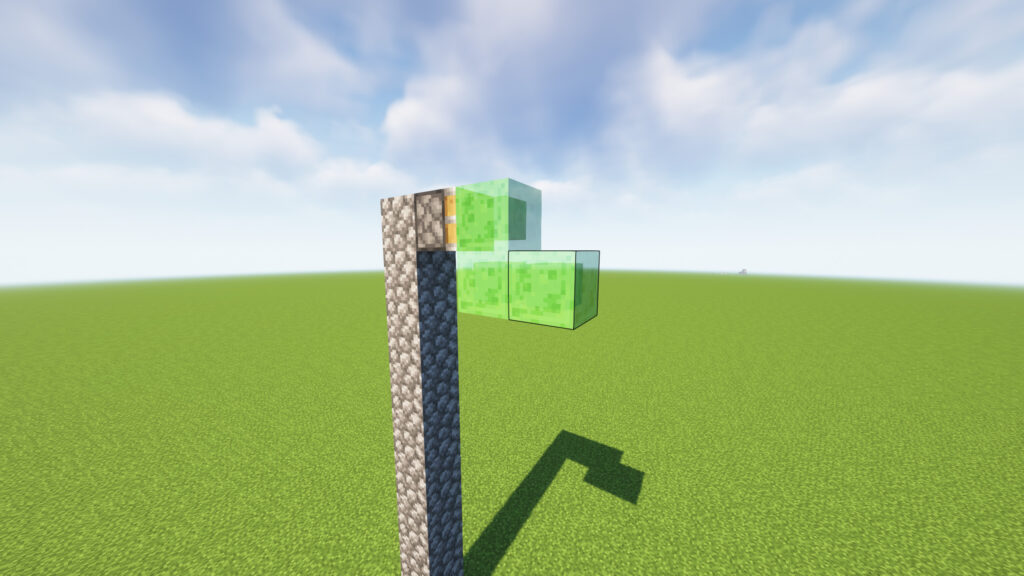
๐Ÿ“ Step 3: Add 3 Slime Blocks ๐ŸŸฉ

Flying Machine TNT Duper

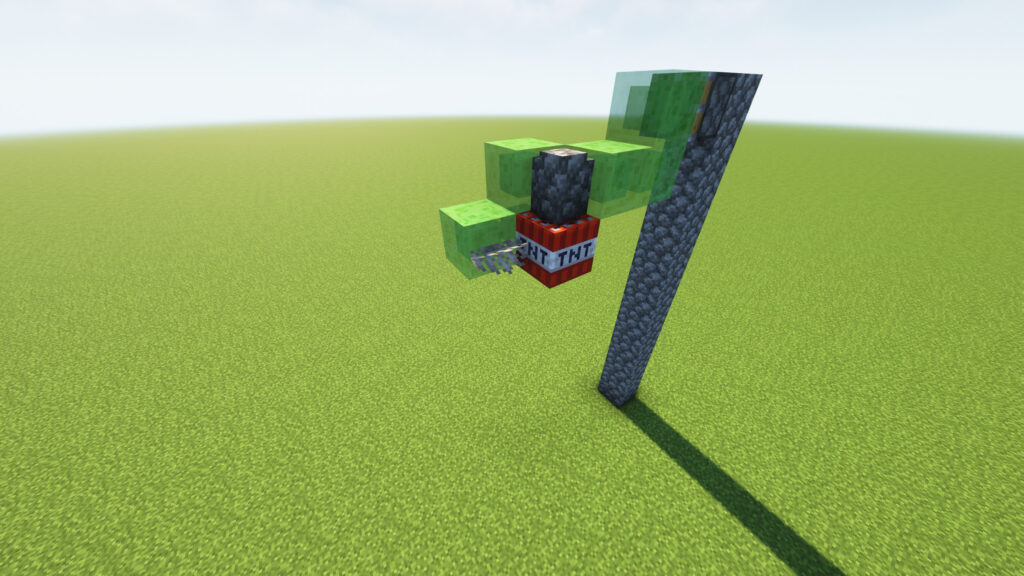
Now attach 3 Slime Blocks to the Sticky Piston to create an L-shaped structure.

๐Ÿ“ Instructions

  1. Place 1 Slime Block directly in front of the Sticky Piston.
  2. Place 1 Slime Block underneath that Slime Block.
  3. Place 1 Slime Block to the right side of the lower Slime Block.

๐ŸŸฉ
๐ŸŸฉ ๐ŸŸฉ

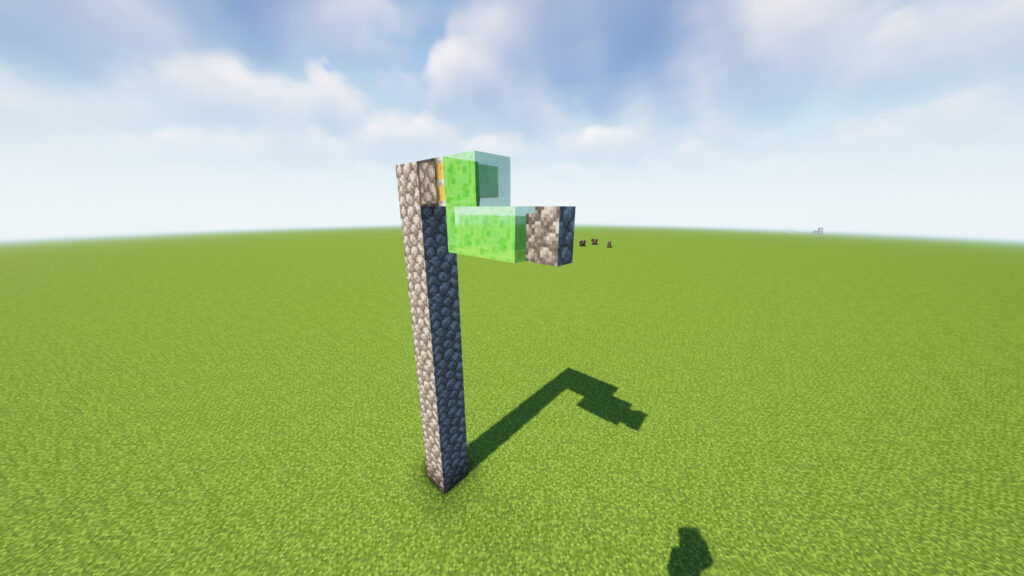
Step 4: Add aย  Support Wall Block ๐Ÿงฑ

Tunnel Bore minecraft

Now place 1 Wall building block on the front side of the lower Slime Block.

๐Ÿ“ Instructions

  1. Locate the lower-right Slime Block from Step 3.
  2. Place 1 building block directly next to it on the front side.
  3. The block should not touch the Sticky Piston.

๐ŸŸฉ
๐ŸŸฉ ๐ŸŸฉ ๐Ÿงฑ

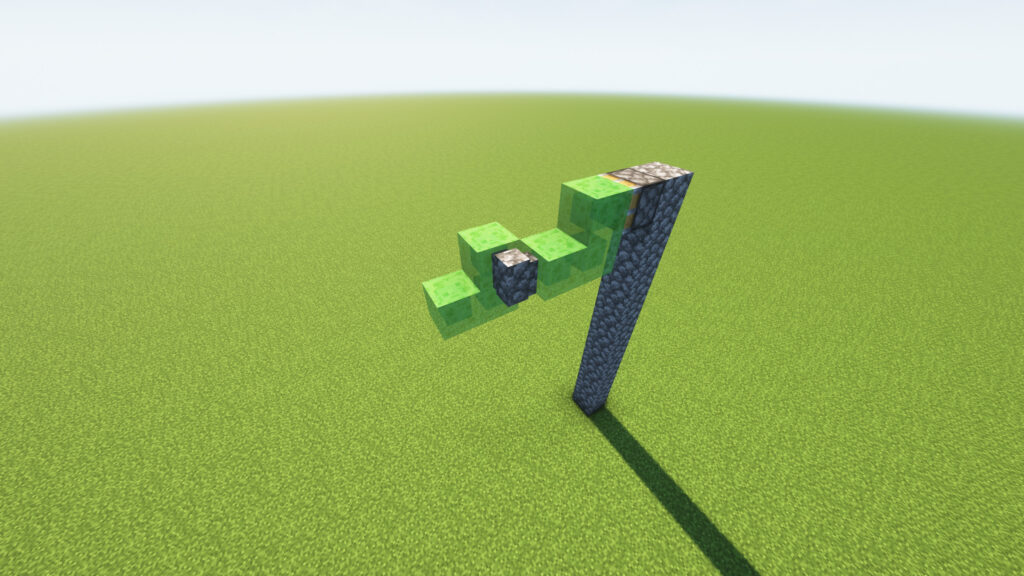
๐Ÿ“ Step 5: Expand the Slime Structure

Redstone Engineering

Now extend the TNT Duper frame by adding 3 more Slime Blocks and moving the Cobblestone Wall into the center.

๐Ÿ“ Instructions

  1. From the lower-right Slime Block, place 1 Slime Block to the left.
  2. Place 1 Slime Block above that new Slime Block.
  3. Place 1 Slime Block to the far left, creating a staircase-like shape.
  4. Place 1 Cobblestone Wall in the center gap between the Slime Blocks, exactly as shown.

๐Ÿ“ Step 6: Add the TNT and Dead Coral Fan ๐Ÿ’ฅ๐Ÿชธ

Automatic Quarry Minecraft

Now it’s time to add the components that make the TNT duplication possible.

๐Ÿ“ Instructions

  1. Place 1 TNT Block directly underneath the Cobblestone Wall.
  2. Attach 1 Dead Coral Fan to the side of the TNT facing the front-left Slime Block.
  3. Make sure the Coral Fan is touching the TNT exactly as shown.

๐ŸŸฉ
๐ŸŸฉ ๐Ÿงฑ ๐ŸŸฉ
๐ŸŸฉ ๐Ÿ’ฃ
๐Ÿชธ

๐Ÿ“ Step 7: Place the Detector Rail ๐Ÿ›ค๏ธ
Survival Automation Minecraft

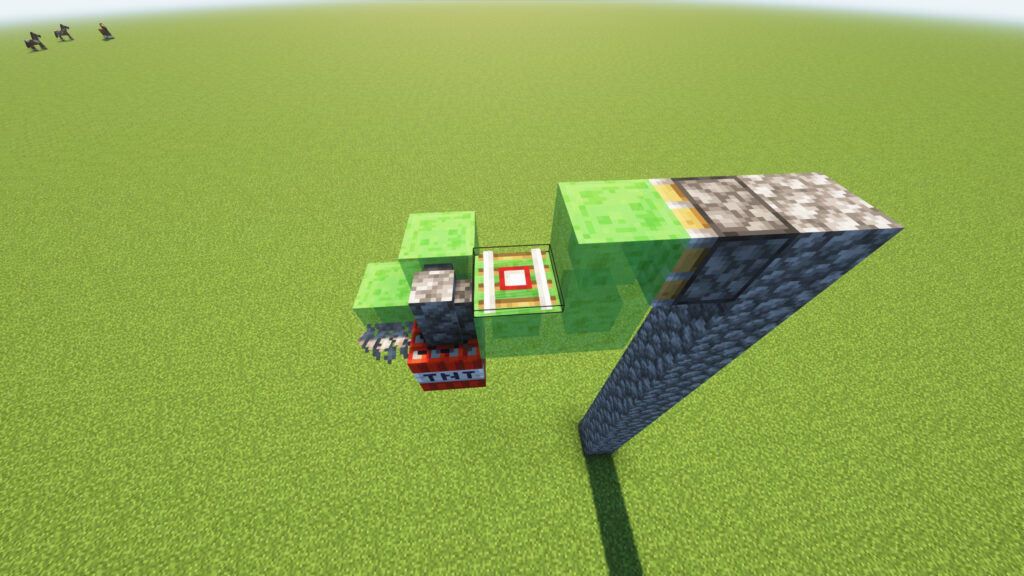
Now add the Detector Rail, which will be used to activate the TNT Duper.

๐Ÿ“ Instructions

  1. Locate the gap between the center Slime Block and the right Slime Block.
  2. Place 1 Detector Rail on top of the center Slime Block.
  3. The rail should sit directly behind the Cobblestone Wall and TNT assembly.

๐Ÿ“ Layout (Top View)

๐ŸŸฉ ๐Ÿงฑ ๐ŸŸฉ
   ๐Ÿ›ค๏ธ
      ๐ŸŸฉ
๐Ÿ“ Step 8: Place the Minecart ๐Ÿšƒ
Unlimited TNT Minecraft

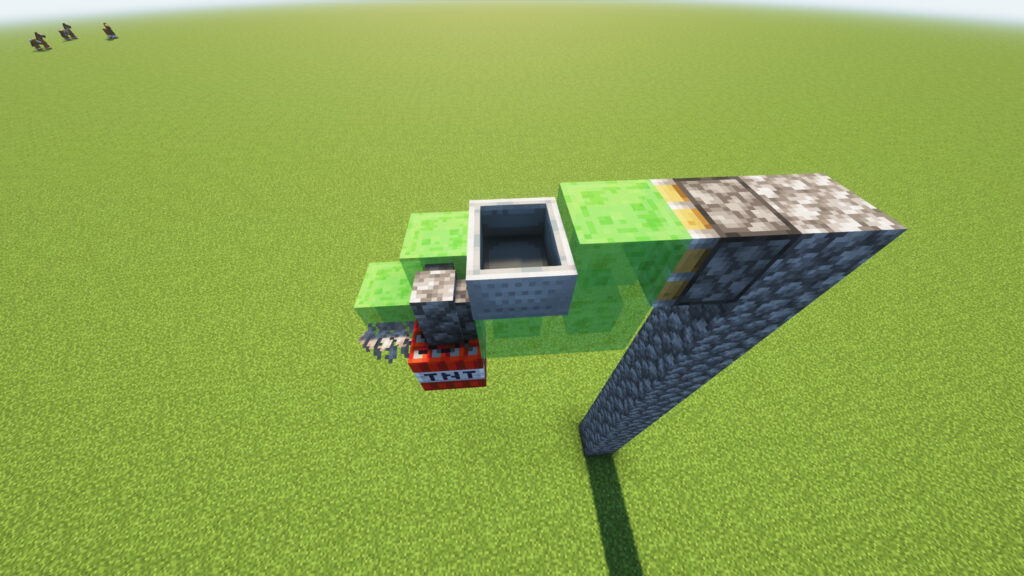
You’re almost done! Now place the Minecart on top of the Detector Rail.

๐Ÿ“ Instructions

  1. Select the Minecart from your inventory.
  2. Aim at the Detector Rail placed in Step 7.
  3. Right-click (or tap) to place the Minecart directly on the rail.

๐Ÿ“ Layout

      ๐Ÿšƒ
      ๐Ÿ›ค๏ธ
๐ŸŸฉ ๐Ÿงฑ ๐ŸŸฉ
   ๐Ÿ’ฃ
   ๐Ÿชธ
๐Ÿ“ Step 9: Add the Lever and Activate the TNT Duper ๐ŸŽš๏ธ๐Ÿ’ฅ
Technical Minecraft

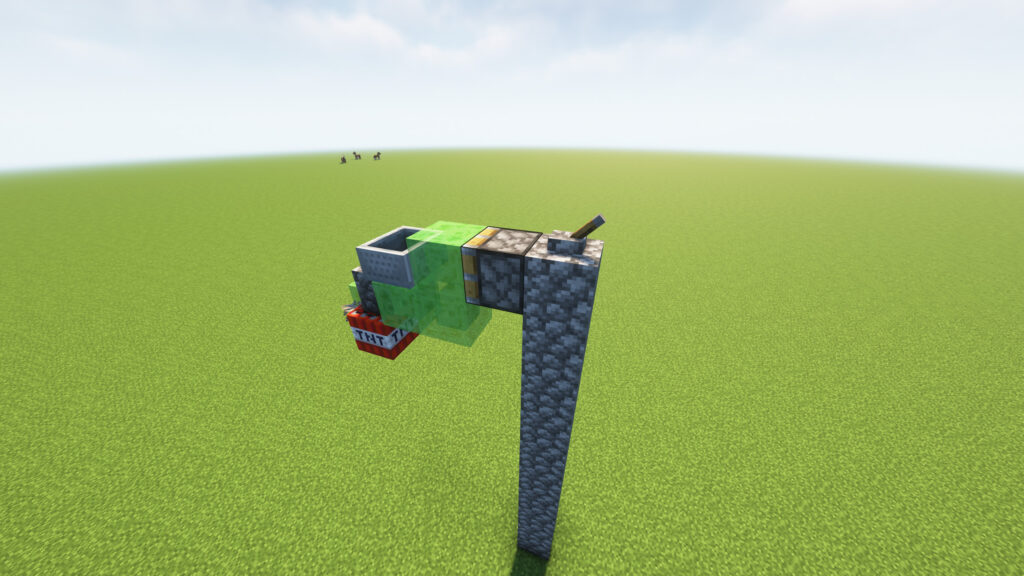
This is the final step! Your TNT Duper is now fully built and ready to launch unlimited TNT.

๐Ÿ“ Instructions

  1. Place 1 Lever on the top block of the pillar.
  2. Position it directly behind the Sticky Piston.
  3. Double-check that all components are connected:
    • ๐ŸŸข Sticky Piston
    • ๐ŸŸฉ 6 Slime Blocks
    • ๐Ÿ’ฃ TNT
    • ๐Ÿชธ Dead Coral Fan
    • ๐Ÿงฑ Cobblestone Wall
    • ๐Ÿ›ค๏ธ Detector Rail
    • ๐Ÿšƒ Minecart
    • ๐ŸŽš๏ธ Lever

๐ŸŽฏ Activate the TNT Duper

  1. Stand at a safe distance. โš ๏ธ
  2. Flip the Lever ON.
  3. The Sticky Piston will activate.
  4. The machine will begin producing primed TNT while keeping the original TNT block in place.

โœ… Final Check

Make sure:

  • โœ”๏ธ Minecart is on the Detector Rail.
  • โœ”๏ธ Dead Coral Fan is attached to the TNT.
  • โœ”๏ธ TNT is directly below the Wall.
  • โœ”๏ธ Lever is connected to the Sticky Piston.
  • โœ”๏ธ No Slime Blocks are missing.

โš ๏ธ Troubleshooting

TNT Doesn’t Duplicate

  • Check the Coral Fan placement.
  • Verify the Minecart is on the Detector Rail.
  • Ensure you’re using Minecraft Java Edition.

Machine Doesn’t Move

  • Confirm the Lever powers the Sticky Piston.
  • Check that all Slime Blocks are connected.

TNT Explodes but Doesn’t Duplicate

  • Recheck the TNT, Wall, and Coral Fan arrangement.
  • Make sure no extra blocks are touching the moving assembly.

๐ŸŽ‰ TNT Duper Complete!

Minecraft TNT Duper

You have successfully built a Minecraft TNT Duper using:

  • ๐Ÿ’ฅ TNT
  • ๐Ÿชธ Dead Coral Fan
  • ๐ŸŸฉ Slime Blocks
  • ๐Ÿ”ฉ Sticky Piston
  • ๐Ÿšƒ Minecart
  • ๐Ÿ›ค๏ธ Detector Rail
  • ๐ŸŽš๏ธ Lever

Now sit back and enjoy the explosions! ๐Ÿ’ฅ๐Ÿš€โ›๏ธ

๐ŸŒ Discover the Best Minecraft Seeds

๐Ÿงญ Explore Highly Rare Minecraft Seeds

Looking for something extraordinary? Our seed collection features some of the rarest Minecraft seeds ever discovered. Whether you’re searching for a massive village spawn, multiple structures near spawn, rare biome combinations, exposed Ancient Cities, Woodland Mansions, or speedrun-friendly worlds, you’ll find unique seeds that can transform your next Minecraft adventure.

โœจ Featured Seed Categories

  • ๐Ÿ˜๏ธ Village Seeds
  • ๐Ÿฐ Mansion Seeds
  • ๐ŸŒธ Cherry Grove Seeds
  • โ„๏ธ Snow Biome Seeds
  • ๐ŸŒด Survival Island Seeds
  • ๐Ÿบ Archaeology & Trail Ruins Seeds
  • ๐Ÿ›๏ธ Ancient City Seeds
  • โšก Speedrun Seeds
  • ๐Ÿ”ฅ Nether Spawn Seeds
  • ๐Ÿ’Ž Rare Structure Combination Seeds

๐Ÿ”— Browse Rare Seeds: CLICK


๐Ÿ“ค Submit Your Minecraft Seed

Share Your Discovery with the Community

Found an amazing Minecraft seed? Submit it to our growing database and help other players discover incredible worlds.

Whether you’ve found:

  • ๐Ÿฐ A Mansion at Spawn
  • ๐Ÿ˜๏ธ Multiple Villages Nearby
  • ๐ŸŒธ Beautiful Cherry Grove Landscapes
  • ๐Ÿ›๏ธ Ancient Cities
  • ๐ŸŒ‹ Rare Terrain Generation
  • โšก Speedrun-Friendly Spawns

We’d love to feature your seed on our website.

Why Submit?

  • ๐ŸŒŸ Get featured on our platform
  • ๐ŸŽฎ Help the Minecraft community
  • ๐Ÿš€ Share unique discoveries
  • ๐Ÿ“ˆ Gain recognition as a seed explorer

๐Ÿ”— Submit Your Seed: CLICK


โ“ Frequently Asked Questions (FAQs)

What is a Minecraft Seed?

A Minecraft seed is a unique code that determines how a world generates, including biomes, structures, villages, and terrain.

Do these seeds work on Java and Bedrock Edition?

Some seeds work on both editions, while others may generate differently. Always check the seed details before creating your world.

How do I use a Minecraft Seed?

When creating a new world, enter the seed number in the Seed field before generating the world.

Can I submit my own seed?

Yes! We encourage players to share their discoveries through our seed submission form.

Are the seeds tested?

We strive to verify every seed before publication, but world generation can vary between Minecraft versions.

Can I search seeds by biome or structure?

Absolutely! Our collection includes filters for villages, mansions, ancient cities, cherry groves, survival islands, and more.

Is seed submission free?

Yes, submitting Minecraft seeds is completely free.


๐Ÿš€ Start Exploring Today

Discover incredible Minecraft worlds, uncover rare terrain generation, and share your best finds with fellow players.

๐Ÿ”— Explore Rare Seeds: CLICK
๐Ÿ”— Submit a Seed: CLICK
๐Ÿ”— View All Categories: CLICK

Scroll to Top