TopBiomeSeeds

Minecraft TNT Duper v26

💥 Minecraft TNT Duper V26 Guide (Java & Bedrock)

Minecraft TNT Duper

🎮 What Is a TNT Duper?

A Minecraft TNT Duper is an advanced redstone machine that generates primed TNT explosions from a single TNT block. It is widely used in Technical Minecraft, Survival Worlds, Mega Base Projects, and Automated Mining Systems to clear large areas quickly and efficiently.

🤔 Why Use a TNT Duper?

⚡ Fast Terrain Clearing

Perfect for:

  • ⛰️ Removing mountains
  • 🕳️ Digging underground bases
  • 🌍 Creating perimeters
  • 🚇 Building tunnels
  • 🔥 Nether excavation

💎 Save Resources

Instead of constantly gathering Gunpowder and Sand, players can use a TNT duper for large-scale projects.

🤖 Redstone Automation

TNT dupers are commonly combined with:

  • 🚀 Flying Machines
  • 🚇 Tunnel Borers
  • 🌍 World Eaters
  • 🏭 Quarry Systems

🖥️ Java Edition vs 📱 Bedrock Edition

☕ Minecraft Java Edition

✅ Supports most TNT duper designs including:

  • Flying Machine TNT Dupers
  • Tunnel Bore TNT Dupers
  • World Eater TNT Dupers

📱 Minecraft Bedrock Edition

⚠️ Most Java TNT dupers don’t work due to different redstone mechanics.

However, Bedrock players can still enjoy:

  • 💥 TNT Cannons
  • 🚀 TNT Launchers
  • ⚙️ Version-specific TNT machines

🎉 Why Is It So Fun?

💥 Endless Explosions

Watching TNT automatically destroy terrain is incredibly satisfying.

🧠 Learn Advanced Redstone

TNT dupers teach:

  • 👀 Observer Mechanics
  • 🔩 Pistons
  • 🟩 Slime Blocks
  • 🚀 Flying Machines

🏗️ Build Bigger Projects

Clear massive areas faster and focus more on building.

⭐ Fun Rating

  • 💥 Explosions: ⭐⭐⭐⭐⭐
  • ⚙️ Automation: ⭐⭐⭐⭐⭐
  • 🧠 Redstone Learning: ⭐⭐⭐⭐⭐
  • 🏰 Mega Projects: ⭐⭐⭐⭐⭐

🏆 Overall Rating: 5/5

Keywords: Minecraft TNT Duper, TNT Duplicator, Java Edition TNT Duper, Bedrock TNT Machine, Flying Machine TNT Duper, World Eater, Tunnel Bore, Redstone Engineering, Automatic Quarry, Survival Automation, Unlimited TNT, Technical Minecraft. 🚀💥⛏️

———————————————————————————————————————————————————————————————————————————————————————————————————————————————-

🔨 How to Build This TNT Duper

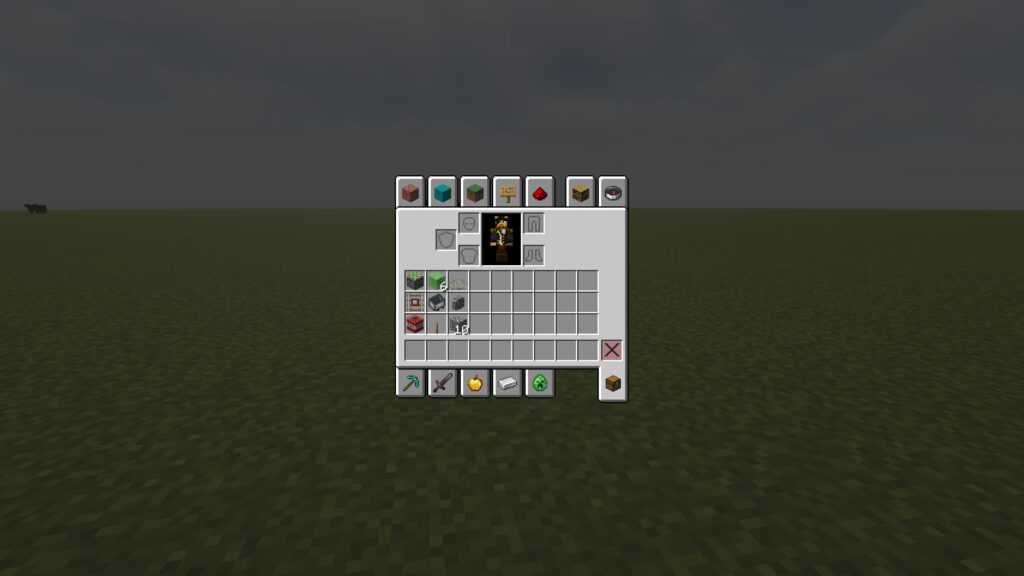
🧱 TNT Duper Materials List

TNT Duplicator Materials Required

🔩 Redstone Components
  • 🟢 1 Sticky Piston
  • 🟩 6 Slime Block
🚂 Rail Components
  • 🛤️ 1 Detector Rail
  • 🚃 1 Minecart
💥 TNT Components
  • 💣 1 TNT Block
  • 🪸 1 Dead Horn Coral Fan
  • 🧱 1 Wall Block (Cobblestone Wall shown)
🚧 Building Materials
  • 🪵 10+ Building Blocks (any block)

📍 Step 1: Build a 10-Block-High Pillar 🧱

Start by creating a vertical pillar that is 10 blocks tall using any temporary building block.
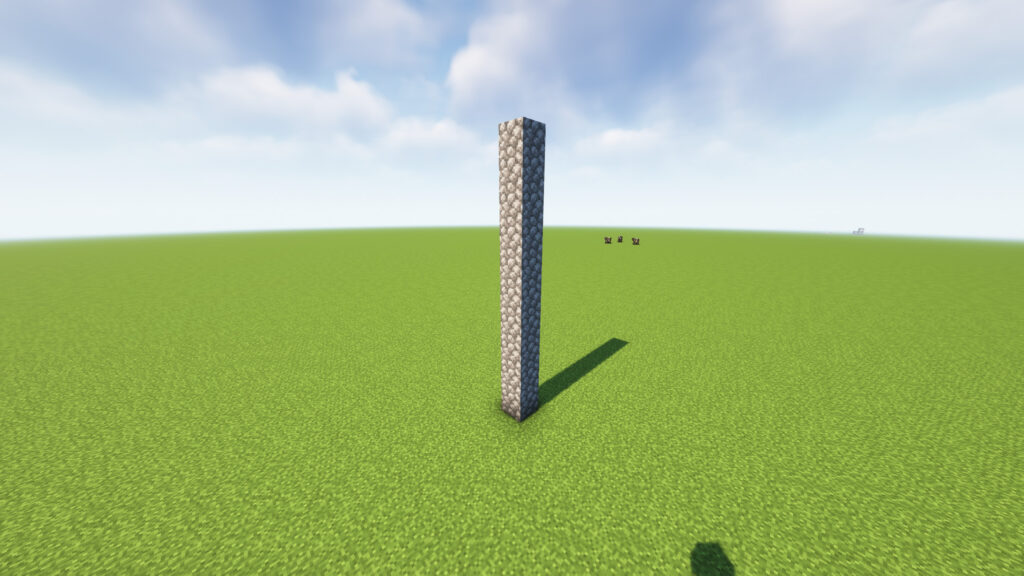
Bedrock TNT Machine

📝 Instructions

  1. Choose a flat area to build.
  2. Place 1 block on the ground.
  3. Continue stacking blocks upward.
  4. Stop when the pillar reaches 10 blocks high.

📏 Dimensions

  • Width: 1 Block
  • Length: 1 Block
  • Height: 10 Blocks

📍 Step 2: Place the Sticky Piston 🔩
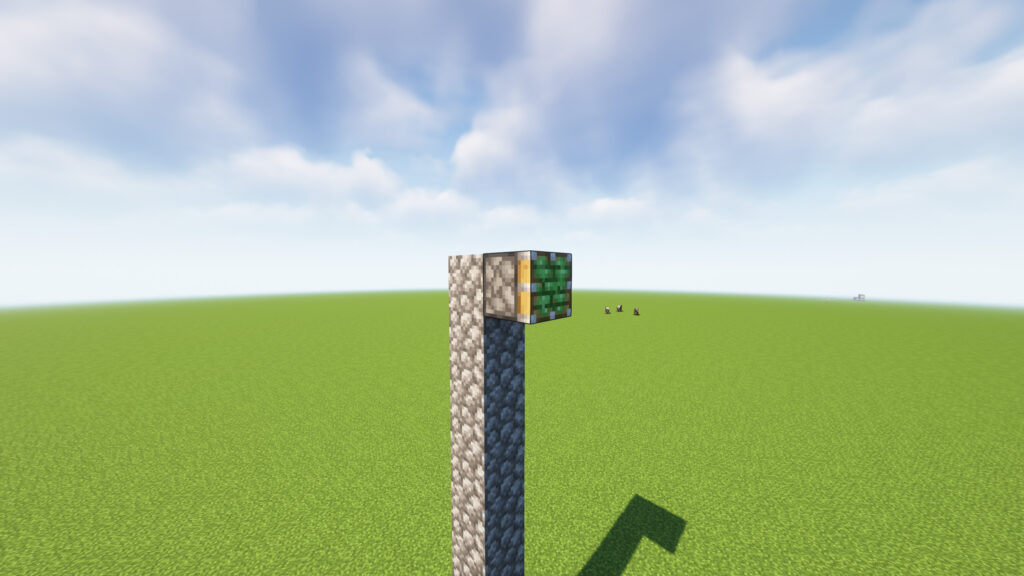
Now move to the top of the 10-block pillar.

📝 Instructions

  1. Stand at the top of the pillar.
  2. Place 1 Sticky Piston on the side of the top block.
  3. Make sure the green sticky face points outward away from the pillar.

🧱🟩
🧱
🧱
🧱
🧱
🧱
🧱
🧱
🧱
🧱

📍 Step 3: Add 3 Slime Blocks 🟩
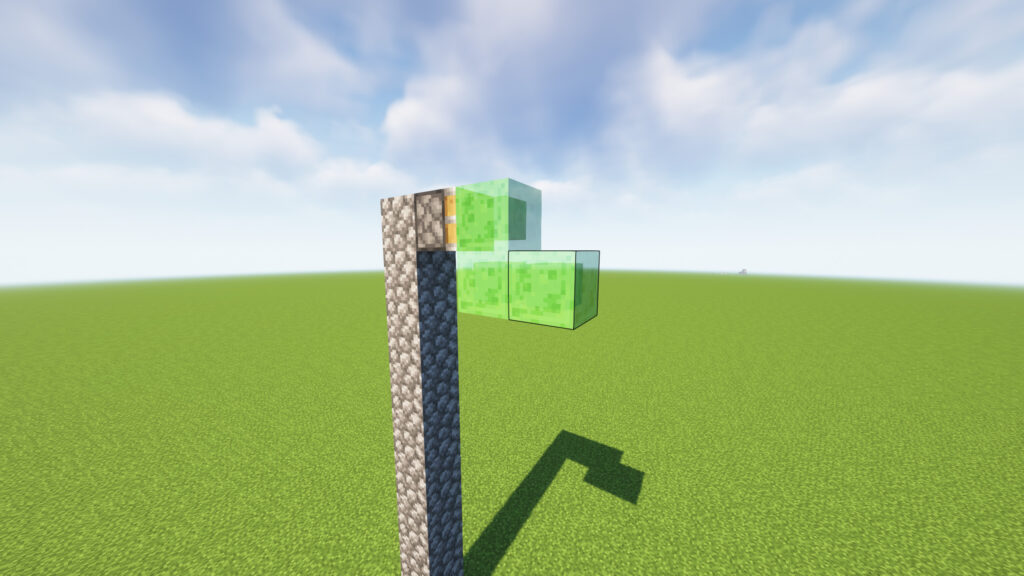
Flying Machine TNT Duper

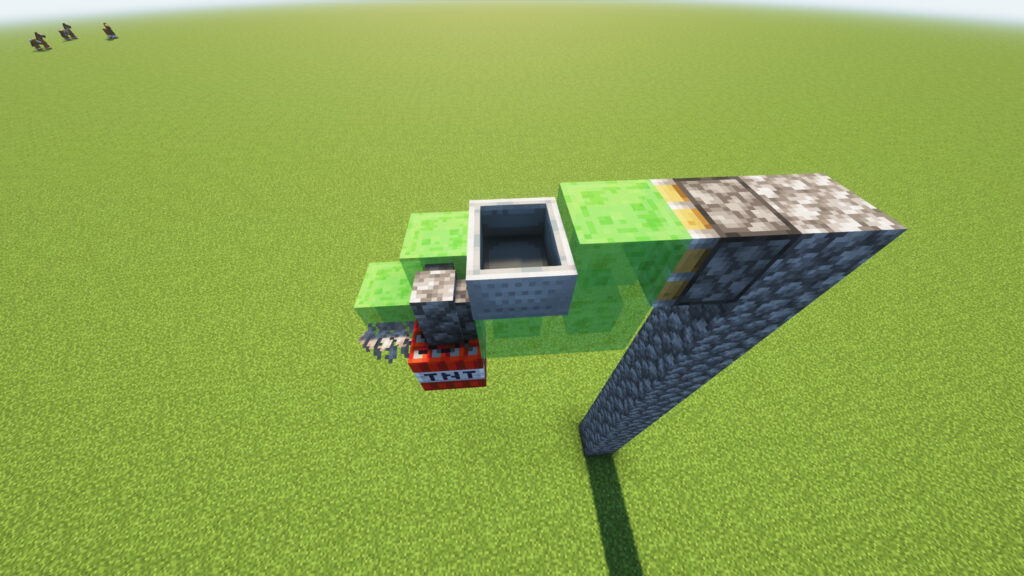
Now attach 3 Slime Blocks to the Sticky Piston to create an L-shaped structure.

📝 Instructions

  1. Place 1 Slime Block directly in front of the Sticky Piston.
  2. Place 1 Slime Block underneath that Slime Block.
  3. Place 1 Slime Block to the right side of the lower Slime Block.

🟩
🟩 🟩

Step 4: Add a  Support Wall Block 🧱
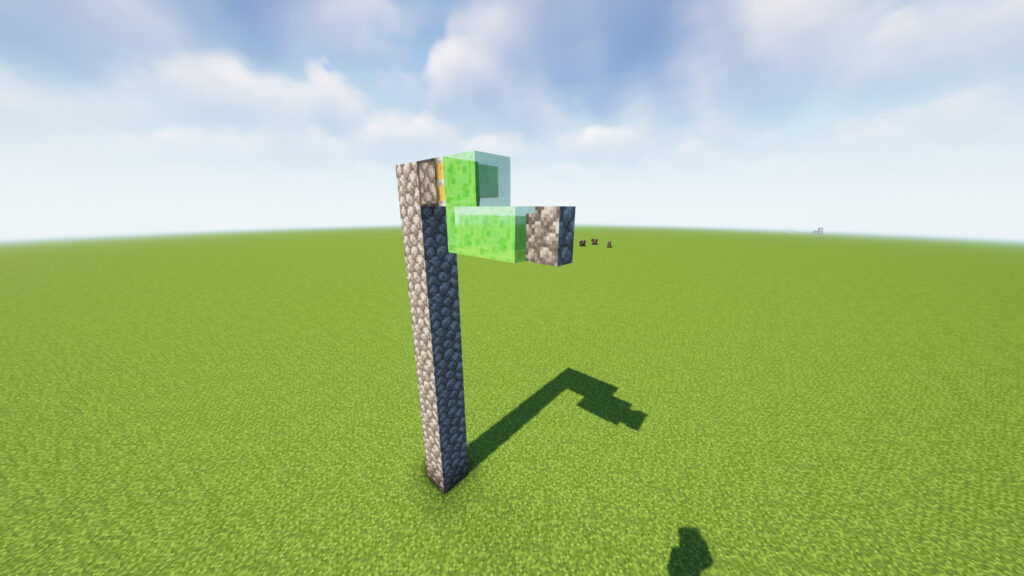
Tunnel Bore minecraft

Now place 1 Wall building block on the front side of the lower Slime Block.

📝 Instructions

  1. Locate the lower-right Slime Block from Step 3.
  2. Place 1 building block directly next to it on the front side.
  3. The block should not touch the Sticky Piston.

🟩
🟩 🟩 🧱

📍 Step 5: Expand the Slime Structure
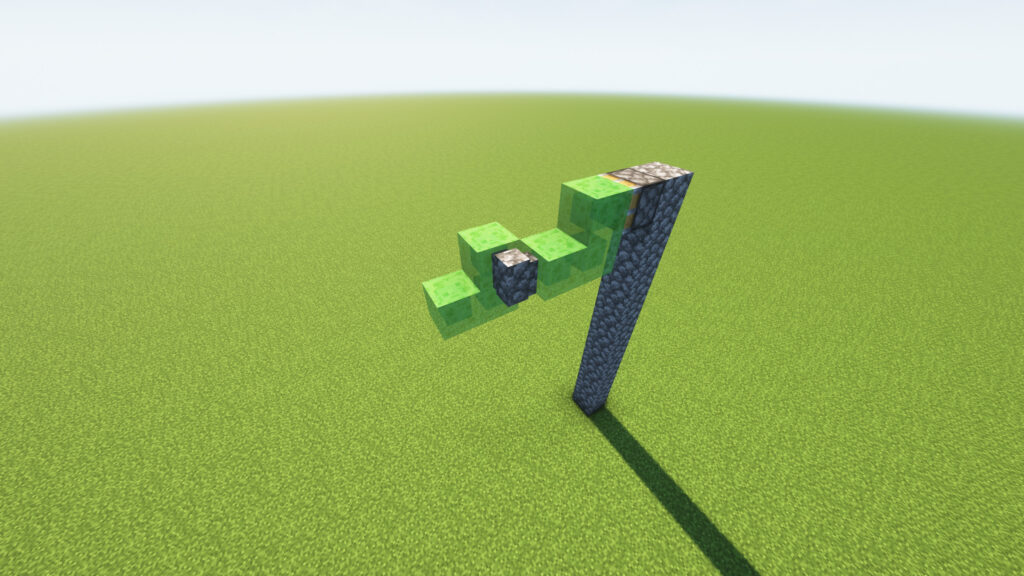
Redstone Engineering

Now extend the TNT Duper frame by adding 3 more Slime Blocks and moving the Cobblestone Wall into the center.

📝 Instructions

  1. From the lower-right Slime Block, place 1 Slime Block to the left.
  2. Place 1 Slime Block above that new Slime Block.
  3. Place 1 Slime Block to the far left, creating a staircase-like shape.
  4. Place 1 Cobblestone Wall in the center gap between the Slime Blocks, exactly as shown.

📍 Step 6: Add the TNT and Dead Coral Fan 💥🪸
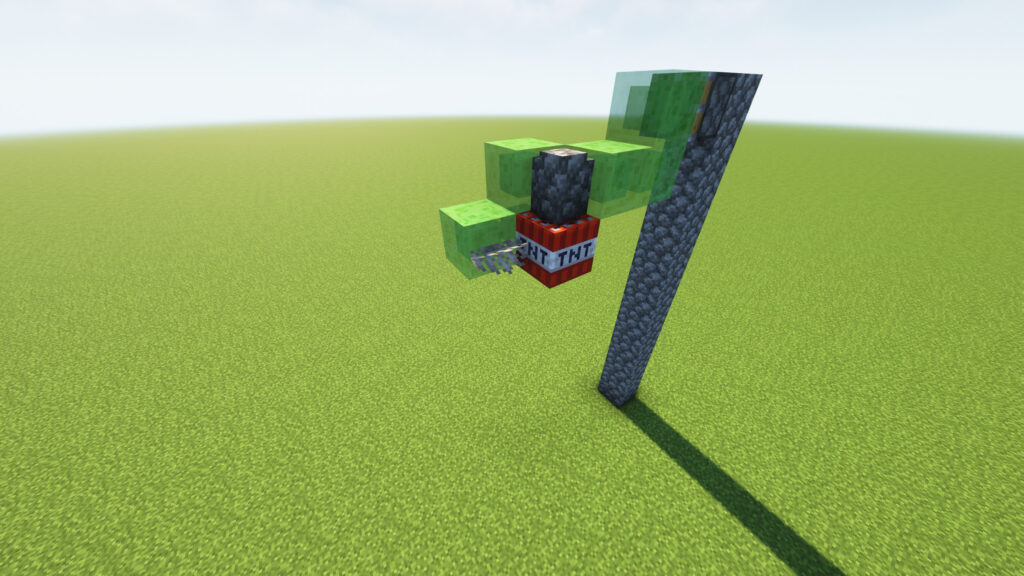
Automatic Quarry Minecraft

Now it’s time to add the components that make the TNT duplication possible.

📝 Instructions

  1. Place 1 TNT Block directly underneath the Cobblestone Wall.
  2. Attach 1 Dead Coral Fan to the side of the TNT facing the front-left Slime Block.
  3. Make sure the Coral Fan is touching the TNT exactly as shown.

🟩
🟩 🧱 🟩
🟩 💣
🪸

📍 Step 7: Place the Detector Rail 🛤️
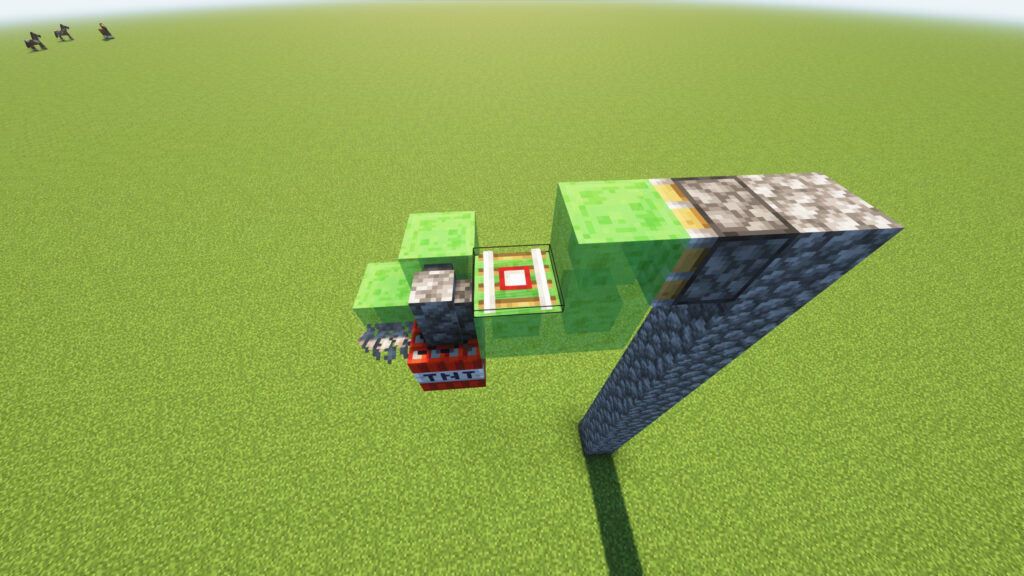
Survival Automation Minecraft

Now add the Detector Rail, which will be used to activate the TNT Duper.

📝 Instructions

  1. Locate the gap between the center Slime Block and the right Slime Block.
  2. Place 1 Detector Rail on top of the center Slime Block.
  3. The rail should sit directly behind the Cobblestone Wall and TNT assembly.

📏 Layout (Top View)

🟩 🧱 🟩
   🛤️
      🟩
📍 Step 8: Place the Minecart 🚃
Unlimited TNT Minecraft

You’re almost done! Now place the Minecart on top of the Detector Rail.

📝 Instructions

  1. Select the Minecart from your inventory.
  2. Aim at the Detector Rail placed in Step 7.
  3. Right-click (or tap) to place the Minecart directly on the rail.

📏 Layout

      🚃
      🛤️
🟩 🧱 🟩
   💣
   🪸
📍 Step 9: Add the Lever and Activate the TNT Duper 🎚️💥
Technical Minecraft

This is the final step! Your TNT Duper is now fully built and ready to launch unlimited TNT.

📝 Instructions

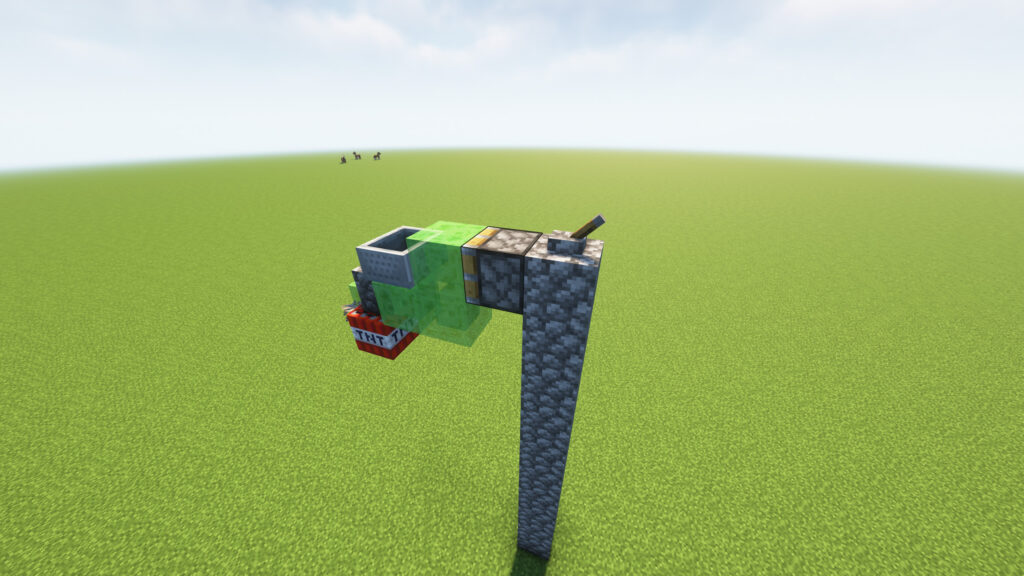
  1. Place 1 Lever on the top block of the pillar.
  2. Position it directly behind the Sticky Piston.
  3. Double-check that all components are connected:
    • 🟢 Sticky Piston
    • 🟩 6 Slime Blocks
    • 💣 TNT
    • 🪸 Dead Coral Fan
    • 🧱 Cobblestone Wall
    • 🛤️ Detector Rail
    • 🚃 Minecart
    • 🎚️ Lever

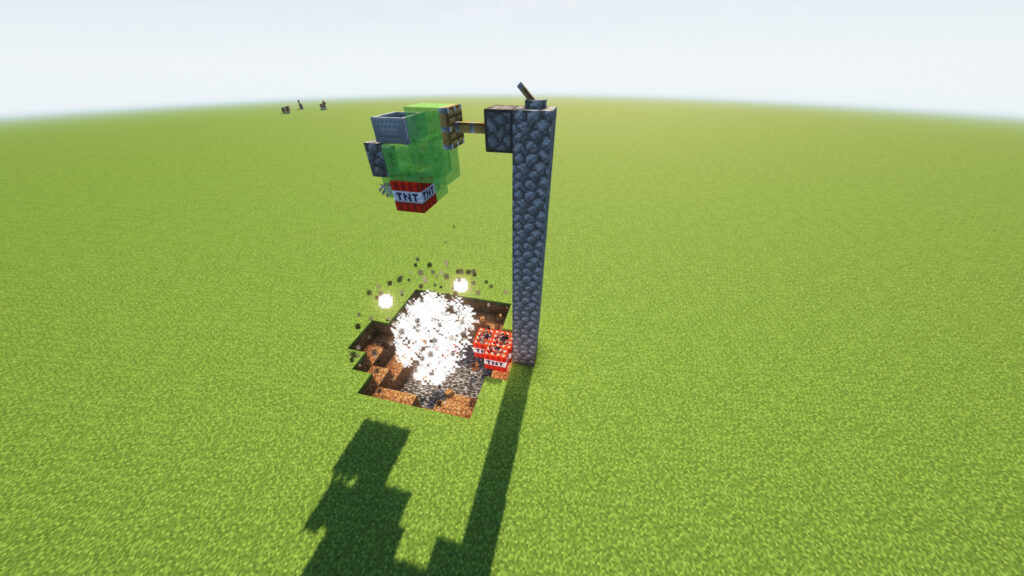
🎯 Activate the TNT Duper

  1. Stand at a safe distance. ⚠️
  2. Flip the Lever ON.
  3. The Sticky Piston will activate.
  4. The machine will begin producing primed TNT while keeping the original TNT block in place.

✅ Final Check

Make sure:

  • ✔️ Minecart is on the Detector Rail.
  • ✔️ Dead Coral Fan is attached to the TNT.
  • ✔️ TNT is directly below the Wall.
  • ✔️ Lever is connected to the Sticky Piston.
  • ✔️ No Slime Blocks are missing.

⚠️ Troubleshooting

TNT Doesn’t Duplicate

  • Check the Coral Fan placement.
  • Verify the Minecart is on the Detector Rail.
  • Ensure you’re using Minecraft Java Edition.

Machine Doesn’t Move

  • Confirm the Lever powers the Sticky Piston.
  • Check that all Slime Blocks are connected.

TNT Explodes but Doesn’t Duplicate

  • Recheck the TNT, Wall, and Coral Fan arrangement.
  • Make sure no extra blocks are touching the moving assembly.

🎉 TNT Duper Complete!

Minecraft TNT Duper

You have successfully built a Minecraft TNT Duper using:

  • 💥 TNT
  • 🪸 Dead Coral Fan
  • 🟩 Slime Blocks
  • 🔩 Sticky Piston
  • 🚃 Minecart
  • 🛤️ Detector Rail
  • 🎚️ Lever

Now sit back and enjoy the explosions! 💥🚀⛏️

🌍 Discover the Best Minecraft Seeds

🧭 Explore Highly Rare Minecraft Seeds

Looking for something extraordinary? Our seed collection features some of the rarest Minecraft seeds ever discovered. Whether you’re searching for a massive village spawn, multiple structures near spawn, rare biome combinations, exposed Ancient Cities, Woodland Mansions, or speedrun-friendly worlds, you’ll find unique seeds that can transform your next Minecraft adventure.

✨ Featured Seed Categories

  • 🏘️ Village Seeds
  • 🏰 Mansion Seeds
  • 🌸 Cherry Grove Seeds
  • ❄️ Snow Biome Seeds
  • 🌴 Survival Island Seeds
  • 🏺 Archaeology & Trail Ruins Seeds
  • 🏛️ Ancient City Seeds
  • ⚡ Speedrun Seeds
  • 🔥 Nether Spawn Seeds
  • 💎 Rare Structure Combination Seeds

🔗 Browse Rare Seeds: CLICK


📤 Submit Your Minecraft Seed

Share Your Discovery with the Community

Found an amazing Minecraft seed? Submit it to our growing database and help other players discover incredible worlds.

Whether you’ve found:

  • 🏰 A Mansion at Spawn
  • 🏘️ Multiple Villages Nearby
  • 🌸 Beautiful Cherry Grove Landscapes
  • 🏛️ Ancient Cities
  • 🌋 Rare Terrain Generation
  • ⚡ Speedrun-Friendly Spawns

We’d love to feature your seed on our website.

Why Submit?

  • 🌟 Get featured on our platform
  • 🎮 Help the Minecraft community
  • 🚀 Share unique discoveries
  • 📈 Gain recognition as a seed explorer

🔗 Submit Your Seed: CLICK


❓ Frequently Asked Questions (FAQs)

What is a Minecraft Seed?

A Minecraft seed is a unique code that determines how a world generates, including biomes, structures, villages, and terrain.

Do these seeds work on Java and Bedrock Edition?

Some seeds work on both editions, while others may generate differently. Always check the seed details before creating your world.

How do I use a Minecraft Seed?

When creating a new world, enter the seed number in the Seed field before generating the world.

Can I submit my own seed?

Yes! We encourage players to share their discoveries through our seed submission form.

Are the seeds tested?

We strive to verify every seed before publication, but world generation can vary between Minecraft versions.

Can I search seeds by biome or structure?

Absolutely! Our collection includes filters for villages, mansions, ancient cities, cherry groves, survival islands, and more.

Is seed submission free?

Yes, submitting Minecraft seeds is completely free.


🚀 Start Exploring Today

Discover incredible Minecraft worlds, uncover rare terrain generation, and share your best finds with fellow players.

🔗 Explore Rare Seeds: CLICK
🔗 Submit a Seed: CLICK
🔗 View All Categories: CLICK

Scroll to Top